The Raspberry Pi has become one of the most popular platforms for running Meshtastic, and it is easy to see why. It brings the flexibility of Linux into the mix, allowing you to run meshtasticd Raspberry Pi deployments alongside MQTT brokers, dashboards, logging tools, and automation workflows. On paper, it feels like the perfect foundation for building something more powerful than a typical handheld node within a LoRa communication system.
But if you have ever tried running a Raspberry Pi Meshtastic setup for more than a few days, especially in an always-on role, you have probably noticed something doesn’t quite hold up. The issue is rarely the software. More often, it is the hardware stack holding everything together. A Raspberry Pi Meshtastic node is only as reliable as the way its radio, sensors, and interfaces are connected.
A lot of Raspberry Pi Meshtastic setups work fine at first. The weak points usually show up later, once the node is expected to stay online and do more than basic testing.
There is an important shift that happens when you move from firmware-based nodes to running meshtasticd on a Raspberry Pi. At that point, you are no longer just running a simple node. You are building something closer to an IoT gateway architecture.
Firmware-based devices are typically portable, designed for mobility, low power consumption, and simplicity. They are not meant to host complex services or act as permanent network anchors.
A Raspberry Pi running meshtasticd plays a very different role. It becomes a Raspberry Pi LoRa gateway, a relay, or even a backbone node. It can bridge data into MQTT, feed dashboards, log activity, and support automation workflows. It is no longer just participating in the mesh; it is helping define a scalable mesh networking hardware environment.
That shift comes with new expectations. Infrastructure nodes are expected to stay online, maintain consistent connectivity, and operate without constant intervention. For that to happen, the hardware integration between the Pi and the radio must be just as stable as the software running on top of it.
A cleaner Raspberry Pi Meshtastic setup should do more than look organized. It should reduce the hardware weak points that cause downtime and make the build easier to repeat across multiple nodes.
A reliable setup should provide:
This is what separates a quick prototype from a Raspberry Pi Meshtastic gateway that is ready for real deployment or even a modular Raspberry Pi IoT gateway.
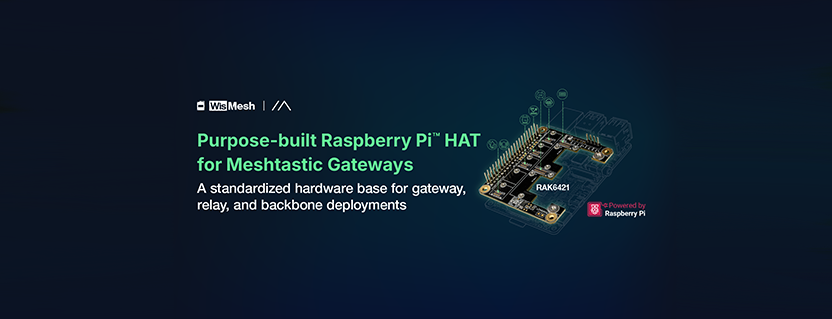
WisMesh Pi HAT RAK6421 gives Raspberry Pi Meshtastic builds a cleaner way to connect WisBlock LoRa radios, GPS, and sensors without USB adapters or loose wiring. It serves as a purpose-built Raspberry Pi LoRa HAT designed for structured deployments.
It creates a more stable, repeatable base for gateways, relays, and backbone nodes running meshtasticd.
When you move from a DIY setup to something you expect to run continuously, the small details start to matter a lot more.
| Feature | What It Changes | Why It Matters |
|---|---|---|
| Direct 40-Pin Raspberry Pi Integration | Connects the radio directly to the Pi without USB adapters | Reduces disconnects and improves stability |
| WisBlock Modular Radio Options | Allows different LoRa modules | Flexible deployment per region or range needs |
| High-Power 1W Radio Support (RAK13302) | Higher transmission power | Better long-range and backbone links |
| GPS and Sensor Expansion | Adds telemetry and location data | Enables monitoring and data-aware nodes |
| HAT+ Auto-Discovery | Automatic hardware detection | Simplifies setup and scaling |
| Gateway-Ready Linux Stack | Runs MQTT, Node-RED, Grafana | Enables full IoT gateway functionality |
| Use Case | Where It Fits | What It Does | Why Stability Matters |
|---|---|---|---|
| Rooftop Backbone Relay | Towers, rooftops | Extends mesh range | Must run continuously without access |
| Indoor Gateway | Homes, offices | Bridges data to systems | Downtime breaks data flow |
| City Mesh Node | Urban deployments | Scalable network nodes | Consistency across nodes |
| Sensor-Aware Gateway | Monitoring sites | Collects telemetry data | Requires continuous accuracy |
Generic USB or LoRa HAT setups are fine for testing, but as systems scale, reliability becomes the focus.
The WisMesh Pi HAT RAK6421 combines:
It becomes a repeatable deployment platform rather than just a prototype setup.
A full setup includes:
Software:
DIY setups often work until they are pushed into always-on roles. Then weak points become real problems.
A structured hardware approach improves reliability and repeatability.
WisMesh Pi HAT RAK6421 supports this transition by turning a Raspberry Pi into a stable Meshtastic platform.
Get in touch: sales@rfdesign.co.za / +27 21 555 8400
Courtesy of RAKwireless
We use cookies to improve your experience on our site. By using our site, you consent to cookies.
Manage your cookie preferences below:
Essential cookies enable basic functions and are necessary for the proper function of the website.
Statistics cookies collect information anonymously. This information helps us understand how visitors use our website.
Google Analytics is a powerful tool that tracks and analyzes website traffic for informed marketing decisions.
Service URL: policies.google.com (opens in a new window)
Google reCAPTCHA helps protect websites from spam and abuse by verifying user interactions through challenges.
SourceBuster is used by WooCommerce for order attribution based on user source.