
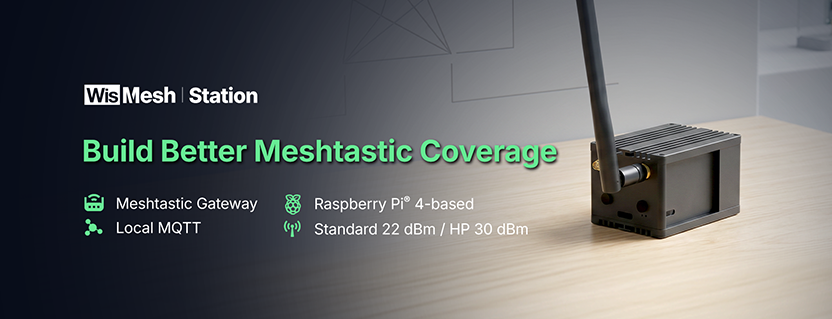
Portable Meshtastic nodes are great for personal use, field testing, hiking, events, and early network building. But as a mesh network grows, many operators eventually need something more stable: an always-on gateway or base station that can help extend coverage, relay messages, process local data, and support monitoring workflows.
That is where a purpose-built Meshtastic base station becomes useful.
Instead of starting from separate boards, enclosures, antennas, power supplies, operating system images, MQTT setup, and dashboard configuration, a ready-to-run Meshtastic gateway gives you a more streamlined path from hardware to deployment.
This guide walks through what to look for in a reliable Meshtastic base station, how to compare DIY and ready-to-run options, and how to choose between WisMesh Station and WisMesh Station HP depending on your coverage goals.
A reliable Meshtastic base station should provide stable power, external antennas, a protected enclosure, a dependable software stack, local MQTT processing, and clear setup steps. For more advanced deployments, it should also support dashboards, automation workflows, sensor expansion, and the right RF power option for the environment.
WisMesh Station combines these elements in a ready-to-run Raspberry Pi 4-based Meshtastic gateway/base station with meshtasticd, Mosquitto MQTT, Node-RED, and Grafana preinstalled. It is available in Standard Power and High Power versions, giving users a clearer choice between dense local coverage and longer-range relay or backbone deployments.
A good Meshtastic network is not just about adding more nodes. It is about placing the right type of node in the right location.
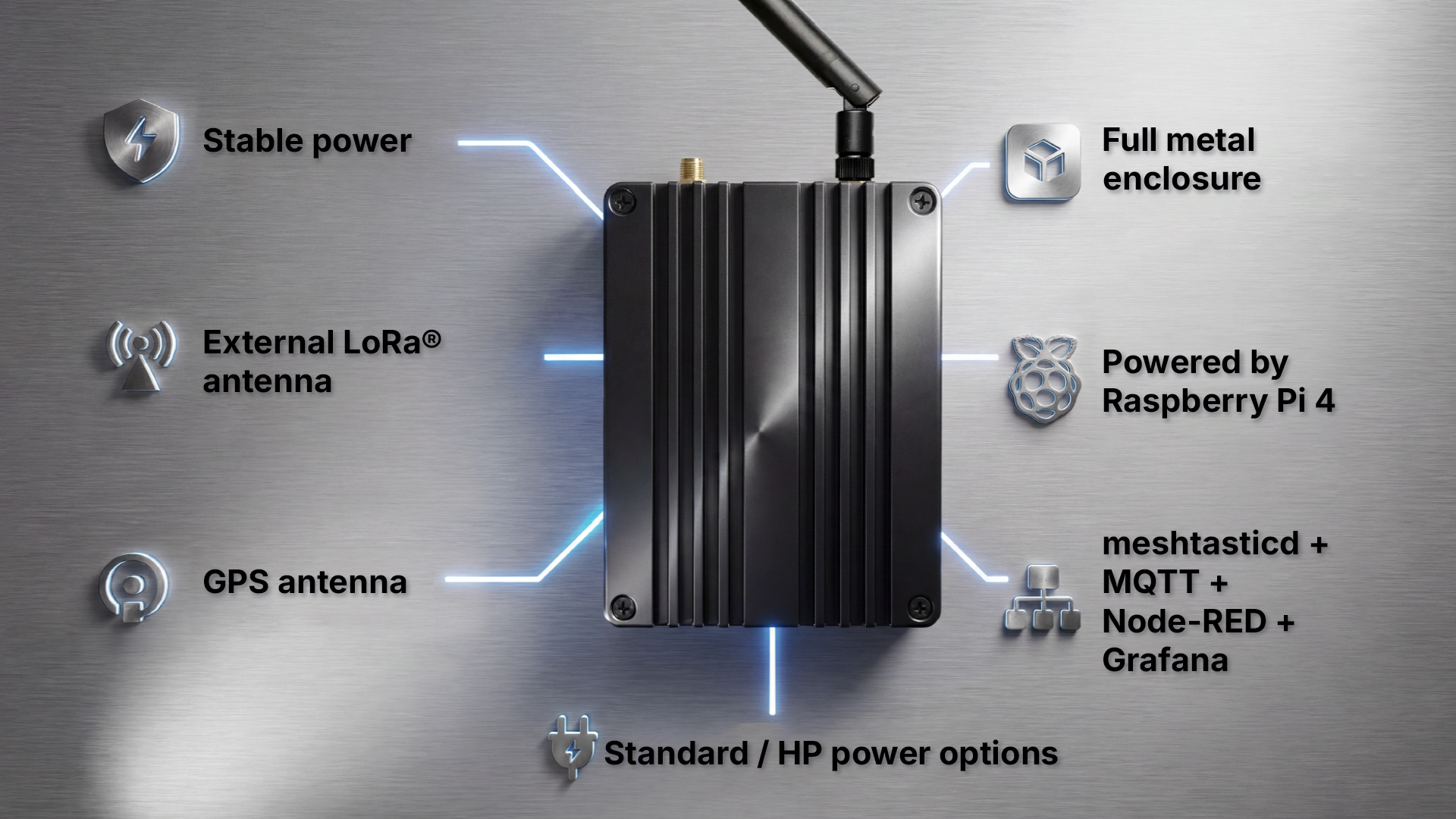
Here are the key things to look for.
A base station is usually expected to stay online for long periods. That means power stability matters more than it does for a casual portable node.
Look for a system that can run continuously from a dependable power source and support long-running services without constant manual intervention.
If the node is meant to sit in one place and support ongoing coverage, it should not be left as a loose stack of boards and cables. A proper enclosure helps protect the hardware, organizes the build, and makes the setup easier to place on a shelf, inside a cabinet, or near a deployment point.
WisMesh Station uses a full metal enclosure, making it more suitable for gateway/base station use than an exposed board-and-HAT setup.
Antenna placement has a major effect on LoRa mesh performance. For a base station or relay node, external antenna access gives operators more flexibility when planning coverage.
WisMesh Station includes external antenna ports for LoRa and GPS, allowing users to plan antenna placement more intentionally than they could with many compact portable nodes.
A Meshtastic gateway/base station may need more than Meshtastic firmware alone. Depending on the deployment, operators may want local MQTT, dashboards, automation flows, and sensor data handling.
That usually means installing and maintaining several services, including:
Having those tools preinstalled can reduce the time between unboxing and configuration.
For community networks, emergency communications, event deployments, and off-grid monitoring, local-first operation can be a major advantage.
A local MQTT broker and dashboard stack can help users collect, route, visualize, or automate mesh-related data without relying on an external cloud service for every workflow.
Not every deployment needs the same power level. Dense urban networks and indoor gateway setups may not need high RF output. Rural links, hilltop relay points, and long-range backbone deployments may benefit from a high-power option where local regulations allow it.
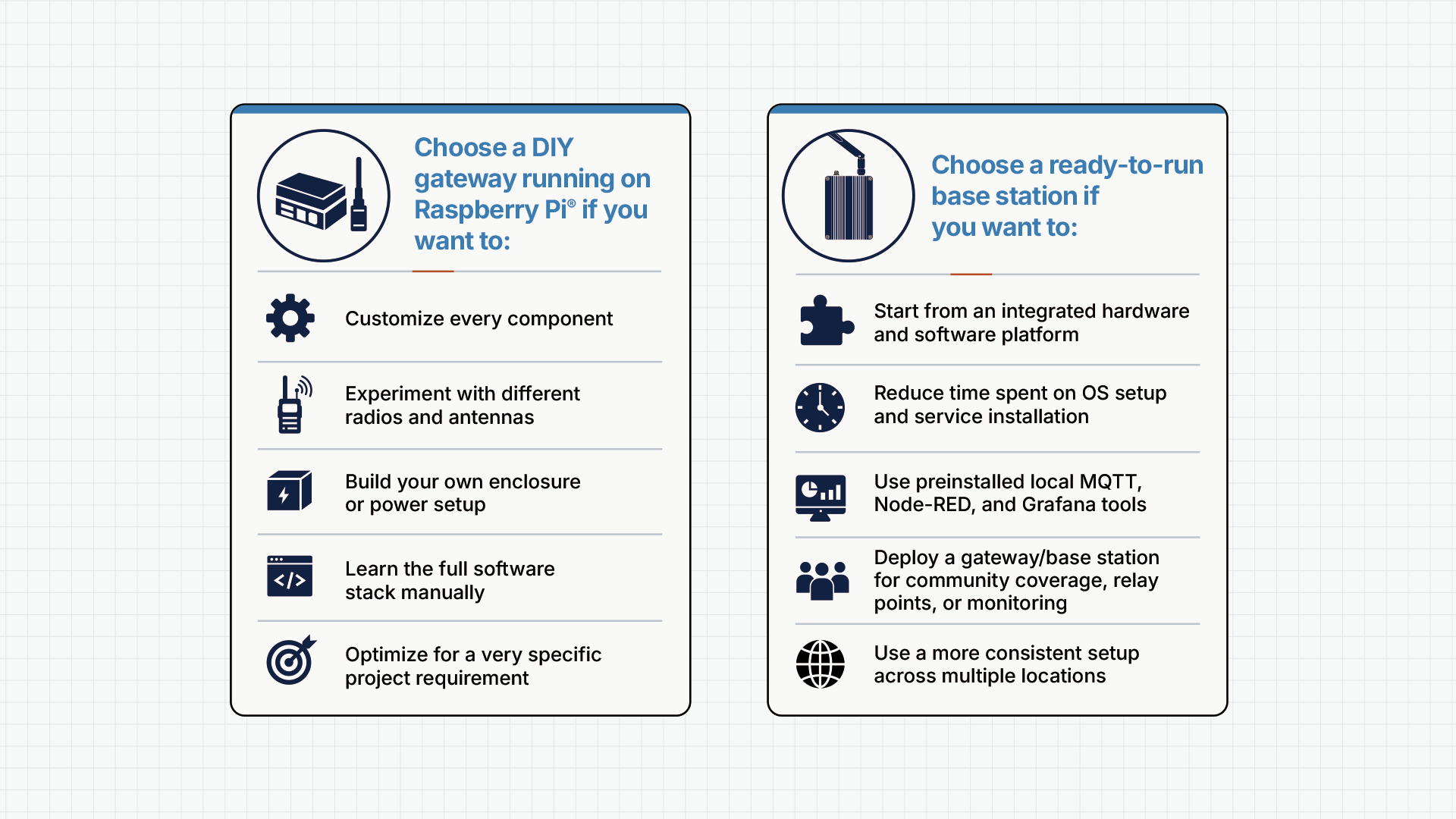
DIY is a big part of the Meshtastic community. It gives users flexibility, control, and room to experiment with different radios, antennas, enclosures, power setups, sensors, and software tools.
For many users, that is exactly the point.
A DIY Meshtastic gateway powered by Raspberry Pi can be the right choice if you want to learn every layer of the system, customize every component, or build around specific project requirements. It also gives experienced builders the freedom to choose their own hardware stack and software approach.
A ready-to-run Meshtastic base station is for a different situation.
It makes sense when the goal is to move faster from planning to deployment, especially for users who already know they need an always-on gateway or relay node. Instead of sourcing each part and configuring every service from scratch, users can start from an integrated platform and focus on coverage, placement, configuration, and operation.
WisMesh Station / WisMesh Station HP is a ready-to-run Meshtastic gateway and base station built around Raspberry Pi 4. It combines LoRa mesh communication, local MQTT processing, dashboard tools, and WisBlock expansion in one enclosed system.
At a high level, WisMesh Station includes:
| Component | What it adds |
|---|---|
| Raspberry Pi 4 | Local compute for gateway services and software workflows |
| LoRa radio | Meshtastic mesh communication |
| meshtasticd | Meshtastic service running on the Raspberry Pi |
| Mosquitto MQTT | Local MQTT broker for message routing and integrations |
| Node-RED | Automation and workflow building |
| Grafana | Dashboards and data visualization |
| GNSS support | Location-aware network mapping and diagnostics |
| WisBlock expansion | Sensor, GPS, and IO expansion options |
| Full metal enclosure | Integrated hardware platform for gateway/base station use |
| External LoRa and GPS antenna ports | More flexible antenna planning |
WisMesh Station comes in two versions: Standard Power and High Power. Both use the same ready-to-run platform. The main difference is output power and the type of deployment each version is best suited for.
| Version | Output Power | Best For |
|---|---|---|
| WisMesh Station | 22 dBm | Urban networks, dense mesh coverage, campuses, indoor gateway setups, and neighborhood deployments |
| WisMesh Station HP | 30 dBm / 1W | Rural links, elevated relay points, long-range backbone nodes, and wider-area coverage where regulations allow |
You are building coverage in an area where nodes are relatively close together.
This can include:
Standard Power is usually the better fit when the goal is stable local coverage rather than maximum output power.
You are trying to connect more distant areas or strengthen a sparse network.
This can include:
The HP version provides 1W / 30 dBm output capability at the hardware level. Actual performance depends on antenna placement, terrain, line of sight, interference, configuration, and local regulations.
Important note: Always review local rules for frequency band, transmit power, antenna gain, and duty cycle before using high-power LoRa hardware. It is the user’s responsibility to configure the device in compliance with local spectrum regulations.
One of the biggest advantages of a Raspberry Pi-based Meshtastic gateway is that it can do more than relay messages.
With WisMesh Station, the local software stack includes meshtasticd, Mosquitto MQTT, Node-RED, and Grafana. This gives operators a base for communication, automation, and monitoring workflows directly on the device.
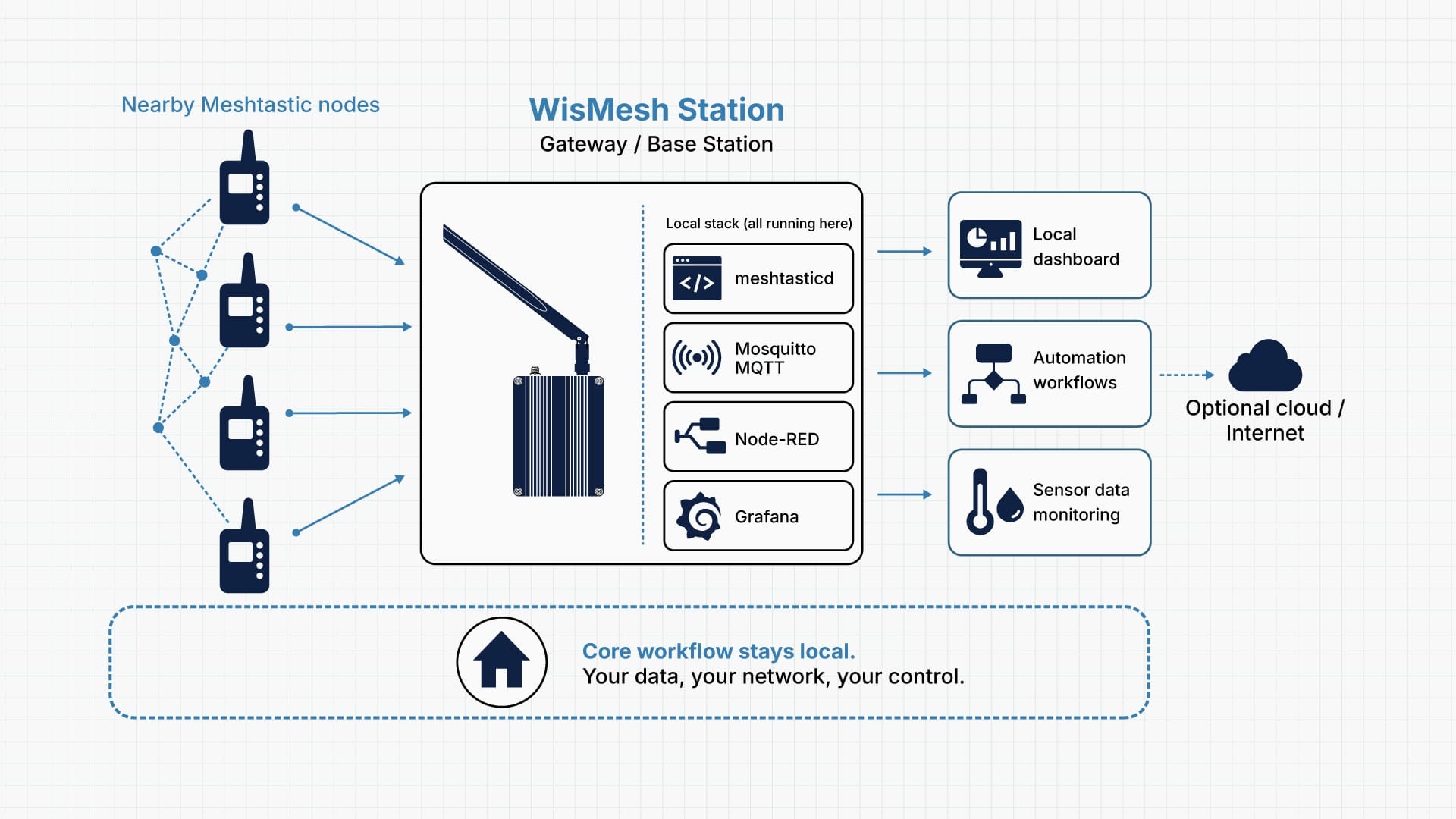
MQTT can help route Meshtastic data into other systems. For example, a Meshtastic node with MQTT can support local message handling, sensor data workflows, and integration with dashboards or automation tools.
For users building community networks, preparedness systems, event networks, or remote monitoring setups, this can be useful because local workflows can continue without depending on an external cloud service for every step.
Node-RED helps users build automation flows without writing everything from scratch. It can connect MQTT data to actions, alerts, dashboards, or other systems.
Users may want to:
Grafana helps turn data into dashboards. For base station operators, dashboards can make it easier to observe system behavior, sensor readings, or other local data streams.
Instead of deploying only a radio, users get a platform that can support communication and visibility.
WisMesh Station can support several types of Meshtastic deployments. The right setup depends on the network layout, terrain, coverage target, and level of local data handling needed.
A community mesh operator may want to expand coverage across a neighborhood, town, or campus. In this case, the priority is often an always-on gateway/base station with good antenna placement, dependable power, and clear configuration.
Recommended fit: WisMesh Station for dense or local coverage; WisMesh Station HP for wider-area relay points where regulations allow.
A relay or backbone operator may want to connect distant areas or strengthen a sparse network. These deployments usually benefit from elevated placement, careful antenna planning, and a hardware platform that can stay online for extended periods.
Recommended fit: WisMesh Station HP, especially for rural links, elevated relay points, and backbone nodes where 1W operation is permitted.
Preparedness groups may need a local communications hub for events, outages, drills, or community response planning. In these scenarios, local-first operation and dependable coverage can be important.
Recommended fit: WisMesh Station or WisMesh Station HP depending on the coverage area, with local MQTT and dashboards used for monitoring and workflows.
Some users want to route mesh data into custom automations, dashboards, or sensor systems. For them, the value is not only LoRa mesh coverage. It is also the integrated software stack.
Recommended fit: WisMesh Station for local gateway and automation workflows, with WisBlock expansion for sensors and IO as the project grows.
Different hardware categories support different parts of a wireless network. The key is choosing the right tool for the job.
| Category | WisMesh Station / WisMesh Station HP (This RAKwireless product) | DIY Powered by Raspberry Pi + LoRa HAT | Portable Meshtastic Nodes | Industrial Gateways for LoRaWAN |
|---|---|---|---|---|
| Primary role | Ready-to-run Meshtastic gateway/base station for always-on coverage and local workflows | Flexible custom gateway build | Personal, portable, or field node | Carrier or enterprise LoRaWAN infrastructure |
| Form factor | Raspberry Pi 4-based system in enclosure with antennas and power included | User-selected Pi, HAT, enclosure, power, and accessories | Compact dev board or handheld-style device | Ruggedized gateway hardware, often outdoor-rated |
| Software stack | meshtasticd, Mosquitto MQTT, Node-RED, and Grafana preinstalled | User-selected OS, Meshtastic services, MQTT, dashboards, and integrations | Meshtastic firmware-focused | LoRaWAN packet forwarder or network server stack |
| Setup approach | Start from an integrated platform, then configure for the deployment | Build and configure each layer based on project goals | Configure as a personal or mobile node | Configure for LoRaWAN network infrastructure |
| Operating mode | Local-first, with local MQTT and dashboards | Depends on user setup | Mostly personal/mobile mesh use | Usually LoRaWAN-focused, not Meshtastic-focused |
| RF options | Standard 22 dBm or HP 30 dBm / 1W | Depends on selected radio hardware | Varies by board | Often higher-grade LoRaWAN radio hardware |
| Best use case | Community meshes, relay points, local comms hubs, MQTT workflows | Makers who want full customization | Hikers, field testers, personal off-grid comms | Enterprise IoT sensor backhaul |
| Who it is for | Users who want to deploy and operate a Meshtastic gateway/base station | Users who enjoy building and maintaining custom systems | Users who need portable nodes | Organizations deploying LoRaWAN networks |
Visit the product page to learn more about the WisMesh Station / WisMesh Station HP.
You can. DIY is a strong option if you want full control over every component and enjoy building your own stack.
A ready-to-run solution makes more sense when you want to reduce setup time, avoid sourcing separate parts, and start from an integrated gateway/base station platform with the core local stack already included.
WisMesh Station can run local services directly on the Raspberry Pi, including Meshtastic services and an MQTT broker. This allows local communication, routing, and data handling within the mesh and connected systems without relying on a cloud service for every workflow.
Internet access may still be useful for updates, remote access, or integrations depending on your configuration.
It depends on your country or region. Frequency plans, transmit power limits, antenna gain rules, and duty cycle requirements vary.
WisMesh Station HP provides high RF output capability at the hardware level, but users are responsible for configuring the device in compliance with local regulations.
Range depends on many factors, including:
Elevated placement and clearer line of sight generally improve performance. Dense urban environments usually introduce more obstruction and interference, while rural or elevated deployments may support longer links.
Choose the frequency plan that matches your local regulations and Meshtastic region settings. Always confirm the correct band, transmit power, duty cycle, and antenna rules for your deployment location.
WisMesh Station supports WisBlock expansion. Compatible sensor options include modules for temperature and humidity, barometric pressure, environmental sensing, CO2, ambient light, UV light, IR temperature, RTC, and GPS-related use cases.
This makes the platform useful not only as a Meshtastic gateway/base station, but also as a local monitoring and telemetry hub.
Yes. WisMesh Station is designed to work as a Meshtastic gateway/base station or relay node using compatible Meshtastic protocols and clients. It can help extend coverage, support message routing, and provide local data workflows through the preinstalled software stack.
No. It is designed to reduce the amount of setup needed to get a Raspberry Pi-based Meshtastic gateway/base station running. Users still need to configure network settings, region settings, channels, antenna setup, and deployment details, but the core local stack is already included.
Get in touch for orders or any queries: sales@rfdesign.co.za / +27 21 555 8400
Courtesy of RAKwireless