
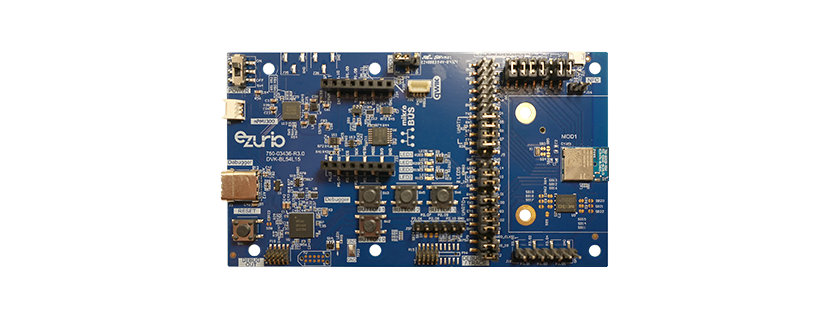
If you have ever tried to stream high-rate sensor data over Bluetooth Low Energy, you know the frustration: the 2 Mbps PHY sounds fast on paper, but once you factor in connection intervals, L2CAP framing, ATT headers, and the rest of the BLE stack, practical throughput tops out around 1.4 Mbps.
For many applications — think raw ADC streams in medical devices, high-resolution motion capture, or real-time industrial monitoring — that is not enough.
We set out to find a better option using hardware you may already have on your bench.
Using Nordic’s Enhanced Shockburst (ESB) protocol with the proprietary 4 Mbps PHY on two Ezurio BL54L15 DVKs, we achieved approximately 3.3 Mbps of sustained unidirectional throughput. That is more than double what BLE can deliver in practice, and we did it with a few hundred lines of C on top of the standard nRF Connect SDK ESB samples.
Transmitter (left) reporting 3.30 Mbps sent, receiver (right) confirming 3.27 Mbps received.

Enhanced Shockburst is a lightweight, proprietary radio protocol that ships as part of the Nordic radio peripheral. It operates in the same 2.4 GHz band as Bluetooth but strips away everything that makes BLE a general-purpose interoperability standard: no GATT, no L2CAP, no frequency hopping, and no connection management.
The application writes a packet, and the radio sends it. That simplicity translates directly into throughput.
The trade-off is clear: ESB only works between Nordic devices. There is no pairing with a phone, no app store integration, and no cross-vendor ecosystem. But if both ends of your link are embedded devices under your control, that constraint may not matter — and the performance gain is significant.
The nRF54 series introduced a proprietary 4 Mbps PHY mode that ESB can take advantage of. Combined with a few configuration tweaks, this unlocks throughput that sits well above BLE’s ceiling.
Starting from the standard ESB PTX/PRX sample applications in nRF Connect SDK v3.2.4, the key modifications were:
None of these changes required modifying the ESB library itself. Everything is achievable through the public configuration API and Kconfig options.
For a deeper dive into the protocol, a full code walkthrough, and a detailed discussion of limitations, see the
Application Note – Enhanced Shockburst (ESB) with 4 Mbps PHY on the BL54L15.
The complete project — transmitter, receiver, and build configurations — is available on GitHub:
BL54x-High-Throughput-ESB-Demo-with-4Mbps-Phy
All you need is two BL54L15 DVKs and a working nRF Connect SDK v3.2.4 setup.
If you are new to building applications for the BL54L15, the
Quick Start Guide for BL54Lxx Application Development with nRF Connect for VS Code
will help you get started.
Flash esb_4mbps_ptx to one board and esb_4mbps_prx to the other, open two serial terminals, and you should see throughput numbers within seconds.
Courtesy of Ezurio