Learn how Ezurio can help integrate external cameras easily into your design.
If you’ve worked on camera bring-up before, you already know where time gets lost. The sensor might be fine, but then issues appear with device trees, drivers, or the image pipeline before you ever see a usable frame.
With the Nitrogen95 SMARC SOM and an Arducam xISP camera, the process becomes much more predictable because the hardware and software are already aligned through the partner ecosystem.
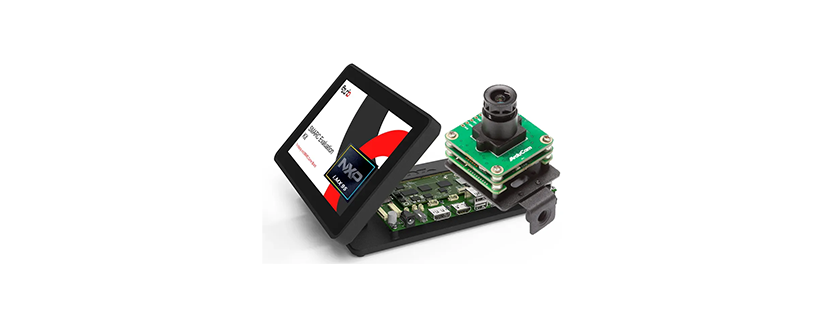
The Nitrogen95 SMARC Evaluation Kit (EVK) is a complete development platform where everything is designed to work together out of the box.
NXP i.MX95-based SMARC SOM
7-inch display with stand
NXP IW611-based Wi-Fi 6 and Bluetooth 5.4
Carrier board for Ezurio SMARC SOMs
2.4GHz/5GHz dual-band Wi-Fi and Bluetooth antenna
Dual DB9 serial cable and power supply
Arducam x-ISP 3.8MP 4K camera
The physical integration is straightforward:
There’s no need to map signals or validate power rails. The interface is already defined and tested between Ezurio and Arducam, eliminating much of the usual early-stage debugging.
For full step-by-step instructions, refer to the
Quick Start Guide: Nitrogen95 SMARC Beta Evaluation Kit
.
Instead of manually modifying device trees, the required configuration is already provided as a device tree overlay.
From U-Boot, ensure the camera overlay is included:
setenv dtbos "imx95-nitrogen-smarc-dsi.dtbo imx95-nitrogen-smarc-nx611.dtbo imx95-nitrogen-smarc-csi0-pivariety.dtbo"
saveenv
reset
This enables the CSI camera interface with a known-good configuration without requiring a kernel rebuild.
Once the system boots, you can confirm the camera is detected successfully by running:
dmesg | grep -E '.*arducam.*'
Expected output:
[11.650954] arducam-pivariety 12-000c: sensor id: 0x0A56
[11.651249] arducam-pivariety 12-000c: firmware version: 0x0010
At this point:
By default, the system boots into the Boot2Qt demo environment. Stop Weston and terminate QTLauncher to enable camera output:
killall weston
killall qtlauncher
Once the display is released, you can capture images and stream video using GStreamer with WaylandSink.
gst-launch-1.0 libcamerasrc src::stream-role=still-capture ! 'video/x-raw,width=1280,height=720' ! waylandsink fullscreen=true
gst-launch-1.0 libcamerasrc src::stream-role=still-capture ! 'video/x-raw,width=1280,height=720' ! identity sync=true ! jpegenc ! multifilesink location="hd.jpg"
The same workflow applies to Full HD and 4K resolutions. The key advantage is starting with a working pipeline rather than building one from scratch.
On many embedded platforms, camera integration issues arise around the ISP and image pipeline rather than the sensor itself.
The Arducam xISP module includes an external ISP already tuned for the sensor, allowing image processing to be handled directly on the camera module. This avoids the need for manual ISP tuning and delivers a stable image immediately.
On the Nitrogen95 platform, the module integrates cleanly with the libcamera and GStreamer pipeline.
Most time savings come from many smaller integration tasks already being solved.
With many platforms, camera bring-up involves troubleshooting CSI lane configuration, power sequencing, connector compatibility, device tree files, drivers, and media pipelines.
With the Nitrogen95 and Arducam combination:
This allows developers to move directly into application development instead of spending days debugging camera integration.
The advantage is not only that the camera works with the Nitrogen95 platform. The hardware interfaces are already validated, the BSP already includes camera support, and the image pipeline delivers usable output immediately.
Instead of spending time getting the camera operational, developers can focus on building their applications.
To learn more about Ezurio validated Arducam cameras, visit: https://www.ezurio.com/partners/technology/arducam
To learn more and order samples of the Nitrogen95 SMARC EVK, visit: https://www.ezurio.com/product/nitrogen95-i-mx95-evaluation-kit
Courtesy of Ezurio
We use cookies to improve your experience on our site. By using our site, you consent to cookies.
Manage your cookie preferences below:
Essential cookies enable basic functions and are necessary for the proper function of the website.
Statistics cookies collect information anonymously. This information helps us understand how visitors use our website.
Google Analytics is a powerful tool that tracks and analyzes website traffic for informed marketing decisions.
Service URL: policies.google.com (opens in a new window)
Google reCAPTCHA helps protect websites from spam and abuse by verifying user interactions through challenges.
SourceBuster is used by WooCommerce for order attribution based on user source.